2 releases
| 0.2.1 | Feb 22, 2025 |
|---|---|
| 0.2.0 | Feb 22, 2025 |
#220 in Images
150KB
3K
SLoC
Fractal Renderer
This is a program used to render fractals using a RON parameter file. It also has a very simple gui for an easier navigation.
Table of contents
How to install
If you have cargo installed:
cargo install fractal_rndr
Otherwise, you can download the latest executable from the releases tab.
How to use
Create a RON parameter file with the following structure (see parameter file reference and preset renders):
Frame((
    img_width: 1920,
    img_height: 1080,

    zoom: 0.000053,
    center_x: -0.1159076,
    center_y: -0.000022,
    fractal: ThirdDegreeRecWithGrowingExponent,

    max_iter: 2000,

    coloring_mode: MinMaxNorm(
        min: Custom(200),
        max: Custom(750),
        map: Linear,
    ),
    sampling: (
        level: Ultra,
        random_offsets: true,
    ),
))
Note: If the parameter file doesn't exist, it will be created automatically with default values.
Then, either ...
-
... render the fractal:
fractal_rndr path/to/param_file.ron path/to/output_image.pngAlternatively, if you have rust installed and downloaded this repository:
cargo run -r -- fractal.ron fractal.png -
... start the gui using the
--guioption:fractal_rndr path/to/param_file.ron path/to/output_image.png --guiThe app looks like this:
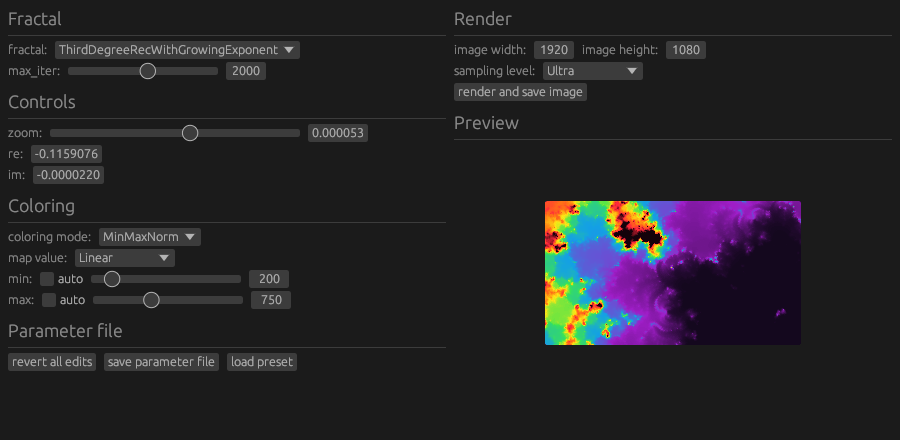
Note: Supported image formats are png and jpg (the extension is used to guess the format)
Dependencies
~13–51MB
~857K SLoC