5 releases
Uses new Rust 2024
| new 0.1.4 | May 7, 2025 |
|---|---|
| 0.1.3 | May 7, 2025 |
| 0.1.2 | May 6, 2025 |
| 0.1.1 | May 6, 2025 |
| 0.1.0 | May 6, 2025 |
#783 in Template engine
122 downloads per month
Used in uibeam
44KB
687 lines
UIBeam
A lightweight, JSX-style HTML template engine for Rust



Features
UI!: JSX-style template syntax with compile-time checksBeam: Component system- Simple : Simply organized API and codebase, with zero external dependencies
- Efficient : Emitting efficient codes, avoiding redundant memory allocations as smartly as possible
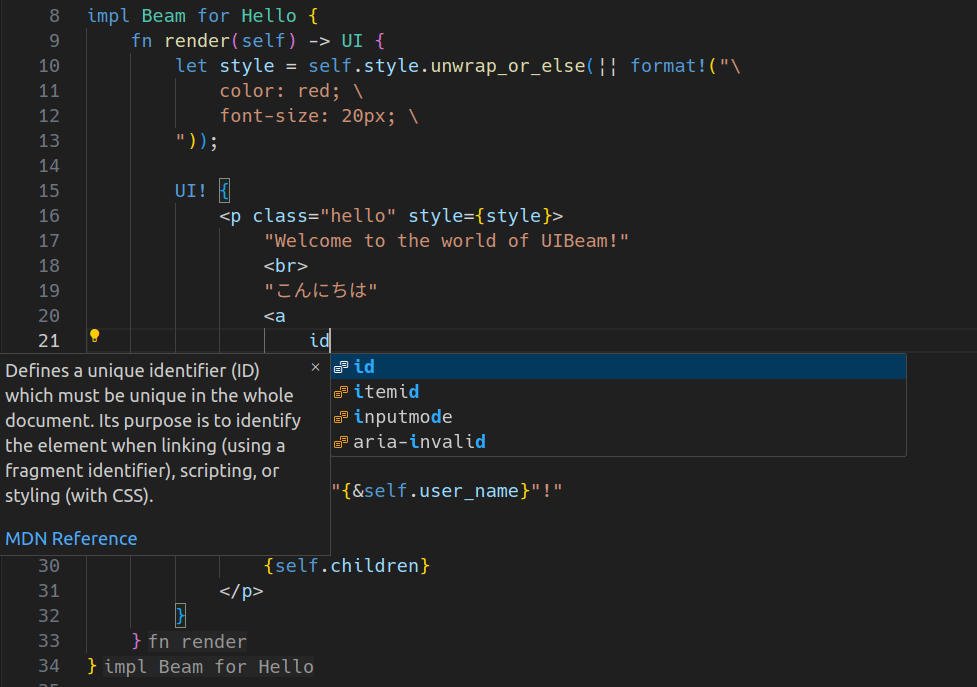
- Better UX : HTML completions and hovers in
UI!by VSCode extension ( search by "uibeam" from extension marketplace )
Examples
UI! syntax
use uibeam::UI;

fn main() {
    let user_name = "foo".to_string();

    let style = "
        color: red; \
        font-size: 20px; \
    ";

    let ui: UI = UI! {
        <p class="hello" style={style}>
            "Welcome to the world of UIBeam!"
            <br>
            "こんにちは"
            <a
                class="user"
                style="color: blue;"
                data-user-id="123"
                href="https://example-chatapp.com/users/123"
            >
                "@"{user_name}"!"
            </a>
        </p>
    };

    println!("{}", uibeam::shoot(ui));
}
Conditional & Iterating rendering
{} at node-position in UI! can render, in addition to Display-able values, any impl IntoIterator<Item = UI>. This includes Option<UI> or any other iterators yielding UIs !
use uibeam::{UI, Beam};

struct Task {
    id: u64,
    title: String,
    subtasks: Vec<String>,
    completed: bool,
}

fn main() {
    let t = Task {
        id: 42,
        title: "try uibeam".to_string(),
        subtasks: vec![],
        completed: false,
    };

    let ui = UI! {
        <div id={format!("task-{}", t.id)}>
            <h2>{t.title}</h2>

            <h3>"subtasks"</h3>
            <ul>
                {t.subtasks.iter().map(|s| UI! {
                    <li>{s}</li>
                })}
            </ul>

            {t.completed.then_some(UI! {
                <i><strong>"completed"</strong></i>
            })}
        </div>
    };

    println!("{}", uibeam::shoot(ui));
}
Components with Beam
use uibeam::{Beam, UI};

struct Layout {
    title: String,
    children: UI,  // `children` field
}

impl Beam for Layout {
    fn render(self) -> UI {
        UI! {
            <html>
                <head>
                    <title>{self.title}</title>
                    <link rel="stylesheet" href="https://cdn.jsdelivr.net/npm/tailwindcss@2.2.19/dist/tailwind.min.css">
                </head>
                <body class="bg-gray-100">
                    {self.children}
                </body>
            </html>
        }
    }
}

struct AdminPage {}

impl Beam for AdminPage {
    fn render(self) -> UI {
        UI! {
            <main class="container mx-auto flex-grow py-8 px-4">
                <section class="bg-white shadow-md rounded-lg p-6">
                    <h1 class="text-2xl font-bold text-gray-800 mb-6">
                        "Password"
                    </h1>
                    <h2 class="text-xl font-semibold text-gray-700 mb-4">
                        "Enter password."
                    </h2>
                    <form method="post" action="" class="w-full">
                        <div class="flex flex-col gap-4">
                            <div class="flex flex-col">
                                <label
                                    for="adminPassword"
                                    class="text-gray-700 text-sm font-bold mb-1"
                                >
                                    "password"
                                </label>
                                <input
                                    required
                                    type="password"
                                    id="adminPassword"
                                    name="adminPassword"
                                    class="py-2 px-3 border border-gray-400 rounded focus:outline-none focus:shadow-outline"
                                />
                            </div>
                        </div>
                        <div class="mt-6">
                            <button
                                type="submit"
                                class="bg-purple-500 hover:bg-purple-700 text-white py-2 px-4 rounded focus:outline-none focus:shadow-outline"
                            >
                                "Send"
                            </button>
                        </div>
                    </form>
                </section>
            </main>
        }
    }
}

fn main() {
    let ui = UI! {
        <Layout title="admin page">  // title: "admin page".into()
            <AdminPage />  // children: (AdminPage {}).render()
        </Layout>
    };

    println!("{}", uibeam::shoot(ui));
}
License
UIBeam is licensed under MIT LICENSE.
Dependencies
~165–580KB
~14K SLoC