2 releases
| new 0.1.1 | May 27, 2025 |
|---|---|
| 0.1.0 | May 25, 2025 |
#1232 in Command line utilities
49 downloads per month
420KB
5.5K
SLoC
PMDaemon - Advanced Process Manager



A high-performance process manager built in Rust, inspired by PM2 with innovative features that exceed the original. PMDaemon is designed for modern application deployment with advanced port management, real-time monitoring, and production-ready web APIs.
📑 Table of Contents
- Key Features
- Installation
- Quick Start
- Command Reference
- Configuration Options
- Web API
- Monitoring
- Comparison with PM2
- Library Usage
- Testing
- Roadmap
- Contributing
- License
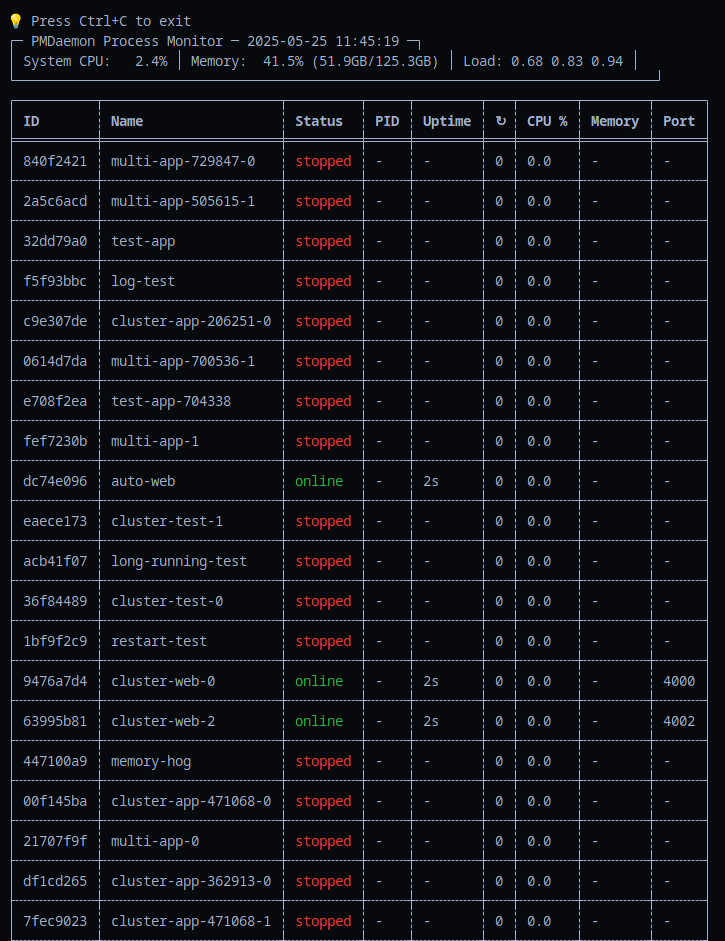
The CLI
🚀 Key Features
Core Process Management
- Process Lifecycle - Start, stop, restart, reload, and enhanced delete operations
- Enhanced Delete Operations - Bulk deletion, status-based deletion, and safe process shutdown
- Clustering - Run multiple instances with automatic load balancing
- Auto-restart - Automatic restart on crashes with configurable limits
- Signal Handling - Graceful shutdown with SIGTERM/SIGINT and custom signals
- Configuration Persistence - Process configs saved and restored between sessions
Advanced Monitoring & Health Checks
- Real-time Monitoring - CPU, memory, uptime tracking with system metrics
- Memory Limit Enforcement - Automatic restart when processes exceed memory limits
- HTTP Health Checks - Monitor process health via HTTP endpoints with configurable timeouts
- Script-based Health Checks - Custom health check scripts for complex validation
- Blocking Start Command - Wait for processes to be healthy before returning from start command
- Log Management - Separate stdout/stderr files with viewing and following
🌟 Innovative Port Management (Beyond PM2)
- Port Range Distribution - Automatically distribute consecutive ports to cluster instances
- Auto-assignment - Find first available port in specified range
- Conflict Detection - Prevent port conflicts at the process manager level
- Runtime Port Overrides - Change ports during restart without modifying saved config
- Port Visibility - Display assigned ports in process listings
Web API & Real-time Updates
- REST API - Full process management via HTTP with PM2-compatible responses
- WebSocket Support - Live process status and system metrics streaming
- Production Web Server - Built on Axum with CORS and security headers
📦 Installation
From Source
git clone https://github.com/entrepeneur4lyf/pmdaemon
cd pmdaemon
cargo build --release
sudo cp target/release/pmdaemon /usr/local/bin/
Using Cargo
cargo install pmdaemon
🚀 Quick Start
Basic Process Management
# Start a process
pmdaemon start app.js --name myapp

# List all processes
pmdaemon list

# Stop a process
pmdaemon stop myapp

# Restart a process
pmdaemon restart myapp

# Delete a process (stops if running)
pmdaemon delete myapp

# Delete all processes
pmdaemon delete all --force

# Delete processes by status
pmdaemon delete stopped --status --force
Clustering with Port Management
# Start 4 instances with port range
pmdaemon start server.js --instances 4 --port 4000-4003

# Auto-assign ports from range
pmdaemon start worker.js --port auto:5000-5100

# Runtime port override (doesn't modify saved config)
pmdaemon restart myapp --port 3001
Memory Limits and Monitoring
# Set memory limit with auto-restart
pmdaemon start app.js --max-memory 100M

# Real-time monitoring with configurable intervals
pmdaemon monit --interval 2

# View logs
pmdaemon logs myapp

# Follow logs in real-time
pmdaemon logs myapp --follow
Health Checks and Blocking Start
# Start with HTTP health check and wait for ready
pmdaemon start app.js --health-check-url http://localhost:9615/health --wait-ready

# Start with script-based health check
pmdaemon start worker.js --health-check-script ./health-check.sh --wait-ready

# Custom health check timeout
pmdaemon start api.js --health-check-url http://localhost:9615/status --wait-timeout 30s
Web API Server
# Start web API server for remote monitoring
pmdaemon web --port 9615 --host 127.0.0.1
📋 Command Reference
| Command | Description | Example |
|---|---|---|
start |
Start a new process | pmdaemon start app.js --name myapp |
stop |
Stop a process | pmdaemon stop myapp |
restart |
Restart a process | pmdaemon restart myapp |
reload |
Graceful restart | pmdaemon reload myapp |
delete |
Delete process(es) | pmdaemon delete myapp |
| Delete all processes | pmdaemon delete all --force |
|
| Delete by status | pmdaemon delete stopped --status |
|
list |
List all processes | pmdaemon list |
monit |
Real-time monitoring | pmdaemon monit --interval 2 |
logs |
View/follow process logs | pmdaemon logs myapp --follow |
info |
Process details | pmdaemon info myapp |
web |
Start web API server | pmdaemon web --port 9615 |
🔧 Configuration Options
Process Configuration
pmdaemon start app.js \
  --name "my-app" \
  --instances 4 \
  --port 3000-3003 \
  --max-memory 512M \
  --env NODE_ENV=production \
  --cwd /path/to/app \
  --log-file /var/log/app.log \
  --health-check-url http://localhost:9615/health \
  --wait-ready
Port Management Options
| Option | Description | Example |
|---|---|---|
--port 3000 |
Single port assignment | Assigns port 3000 |
--port 3000-3005 |
Port range for clusters | Distributes 3000-3005 |
--port auto:4000-4100 |
Auto-find available port | First available in range |
Health Check Options
| Option | Description | Example |
|---|---|---|
--health-check-url <url> |
HTTP endpoint for health checks | http://localhost:9615/health |
--health-check-script <path> |
Script to run for health validation | ./scripts/health-check.sh |
--health-check-timeout <time> |
Timeout for individual health checks | 5s, 30s, 1m |
--health-check-interval <time> |
Interval between health checks | 10s, 30s, 1m |
--health-check-retries <num> |
Number of retries before failure | 3, 5, 10 |
--wait-ready |
Block start until health checks pass | Boolean flag |
--wait-timeout <time> |
Timeout for blocking start | 30s, 1m, 5m |
Delete Options
| Option | Description | Example |
|---|---|---|
delete <name> |
Delete single process by name/ID | pmdaemon delete myapp |
delete all |
Delete all processes | pmdaemon delete all |
delete <status> --status |
Delete processes by status | pmdaemon delete stopped --status |
--force / -f |
Skip confirmation prompts | pmdaemon delete all --force |
Valid statuses for --status flag:
starting- Processes currently starting uponline- Running processesstopping- Processes currently shutting downstopped- Processes that have exitederrored- Processes that crashed or failedrestarting- Processes currently restarting
Safety Features:
- All delete operations automatically stop running processes before deletion
- Interactive confirmation prompts for bulk operations (unless
--forceis used) - Graceful process shutdown with proper cleanup of files and ports
- Clear feedback showing how many processes were stopped vs. deleted
🌐 Web API
PMDaemon provides a comprehensive REST API compatible with PM2:
Endpoints
| Method | Endpoint | Description |
|---|---|---|
GET |
/api/processes |
List all processes |
POST |
/api/processes |
Start a new process |
DELETE |
/api/processes/:id |
Stop/delete a process |
GET |
/api/system |
System metrics |
GET |
/api/logs/:id |
Process logs |
WS |
/ws |
Real-time updates |
Example API Usage
# List processes
curl http://localhost:9615/api/processes

# Start a process
curl -X POST http://localhost:9615/api/processes \
  -H "Content-Type: application/json" \
  -d '{"name": "api-server", "script": "node", "args": ["server.js"]}'

# WebSocket for real-time updates
wscat -c ws://localhost:9615/ws
📊 Monitoring
PMDaemon provides comprehensive monitoring capabilities:
Real-time Metrics
- CPU usage percentage
- Memory usage (RSS)
- Process uptime
- Restart count
- Port assignments
- Process state
- Process ID (PID) for debugging
Configurable Monitoring
- Configurable update intervals - Customize refresh rates (1s, 2s, 5s, etc.)
- Beautiful table formatting - Professional display using comfy-table
- Color-coded status indicators - Visual process state identification
- System overview - CPU, memory, load average, and uptime
Log Management
- Separate stdout/stderr files
- Real-time log following -
tail -ffunctionality for live log monitoring - Configurable log retrieval - Get last N lines from log files
- Missing file handling - Graceful handling of non-existent log files
- HTTP log access via API
🆚 PMDaemon vs PM2
| Feature | PMDaemon | PM2 |
|---|---|---|
| Port range distribution | ✅ | ❌ |
| Auto port assignment | ✅ | ❌ |
| Runtime port override | ✅ | ❌ |
| Built-in port conflict detection | ✅ | ❌ |
| HTTP health checks | ✅ | ❌ |
| Script-based health checks | ✅ | ❌ |
| Blocking start command | ✅ | ❌ |
| Configurable monitor intervals | ✅ | ❌ |
| Real-time log following | ✅ | ❌ |
| Professional table formatting | ✅ | ❌ |
| PID display in monitoring | ✅ | ❌ |
| Enhanced delete operations | ✅ | ❌ |
| Bulk deletion (delete all) | ✅ | ❌ |
| Status-based deletion | ✅ | ❌ |
| Safe process shutdown | ✅ | ❌ |
| Memory limit enforcement | ✅ | ✅ |
| WebSocket real-time updates | ✅ | ❌ |
| Rust performance | ✅ | ❌ |
| PM2-compatible API | ✅ | ✅ |
Process Flowchart
graph TD
17017["User<br>External Actor"]
subgraph 17008["PMDaemon Application<br>Rust"]
17009["CLI Entry Point<br>Rust"]
17010["Web API & UI<br>Rust / HTTP"]
17011["Core Process Orchestrator<br>Rust"]
17012["Process Execution & State<br>Rust"]
17013["Configuration Service<br>Rust"]
17014["Process Health Monitor<br>Rust"]
17015["Metrics & Monitoring<br>Rust"]
17016["OS Signal Handler<br>Rust"]
%% Edges at this level (grouped by source)
17009["CLI Entry Point<br>Rust"] -->|Executes commands via| 17011["Core Process Orchestrator<br>Rust"]
17010["Web API & UI<br>Rust / HTTP"] -->|Manages processes via| 17011["Core Process Orchestrator<br>Rust"]
17010["Web API & UI<br>Rust / HTTP"] -->|Gets status from| 17015["Metrics & Monitoring<br>Rust"]
17016["OS Signal Handler<br>Rust"] -->|Notifies of OS signals| 17011["Core Process Orchestrator<br>Rust"]
17011["Core Process Orchestrator<br>Rust"] -->|Controls & Monitors| 17012["Process Execution & State<br>Rust"]
17011["Core Process Orchestrator<br>Rust"] -->|Loads/Saves config| 17013["Configuration Service<br>Rust"]
17011["Core Process Orchestrator<br>Rust"] -->|Manages| 17014["Process Health Monitor<br>Rust"]
17011["Core Process Orchestrator<br>Rust"] -->|Updates/Gets metrics from| 17015["Metrics & Monitoring<br>Rust"]
17011["Core Process Orchestrator<br>Rust"] -->|Initializes| 17016["OS Signal Handler<br>Rust"]
17014["Process Health Monitor<br>Rust"] -->|Checks status of| 17012["Process Execution & State<br>Rust"]
17015["Metrics & Monitoring<br>Rust"] -->|Collects metrics from| 17012["Process Execution & State<br>Rust"]
17012["Process Execution & State<br>Rust"] -->|Uses config from| 17013["Configuration Service<br>Rust"]
end
%% Edges at this level (grouped by source)
17017["User<br>External Actor"] -->|Uses CLI| 17009["CLI Entry Point<br>Rust"]
17017["User<br>External Actor"] -->|Accesses Web UI/API| 17010["Web API & UI<br>Rust / HTTP"]
🔧 Library Usage
PMDaemon can also be used as a Rust library:
use pmdaemon::{ProcessManager, ProcessConfig, config::PortConfig};

#[tokio::main]
async fn main() -> Result<(), Box<dyn std::error::Error>> {
    let mut manager = ProcessManager::new().await?;

    let config = ProcessConfig::builder()
        .name("web-cluster")
        .script("node")
        .args(vec!["app.js"])
        .instances(4)
        .port(PortConfig::Range(3000, 3003))
        .max_memory_restart(512 * 1024 * 1024) // 512MB
        .build()?;

    manager.start(config).await?;
    println!("Started 4-instance cluster on ports 3000-3003");

    Ok(())
}
🧪 Testing
PMDaemon has comprehensive test coverage:
# Run all tests
cargo test

# Run with coverage
cargo test --all-features

# Run documentation tests
cargo test --doc

# Run integration tests
cargo test --test integration_tests

# Run end-to-end tests
cargo test --test e2e_tests
Test Coverage
- 223 Total Tests
- 146 Unit tests (including comprehensive delete operation tests)
- 13 Integration tests (including delete functionality tests)
- 8 End-to-end tests
- 56 Documentation tests
🗺️ Roadmap
Completed Features ✅
- ✅ Core process management (Phase 1-3)
- ✅ CLI interface with all PM2-compatible commands (Phase 5)
- ✅ Advanced monitoring and logging (Phase 6)
- ✅ Web API and WebSocket support (Phase 7)
- ✅ Health checks and blocking start (Phase 8)
- ✅ Enhanced delete operations with bulk and status-based deletion
- ✅ Safe process shutdown and lifecycle management
- ✅ Comprehensive test suite (Phase 10.1-10.3)
In Progress 🚧
- 📝 Integration examples and documentation (Phase 9)
- 📝 API documentation beyond docs.rs
- 📝 Performance benchmarks vs PM2
Future Enhancements 🔮
- 🎨 v2.0 - Enhanced CLI with ratatui for interactive terminal UI
- 📊 Advanced metrics visualization
- 🔌 Plugin system for custom monitors
- 🌍 Distributed process management
🤝 Contributing
Contributions are welcome! Please feel free to submit a Pull Request.
- Fork the repository
- Create your feature branch (
git checkout -b feature/amazing-feature) - Commit your changes (
git commit -m 'Add some amazing feature') - Push to the branch (
git push origin feature/amazing-feature) - Open a Pull Request
Development Guidelines
- Follow Rust best practices and idioms
- Add tests for new features
- Update documentation as needed
- Ensure all tests pass before submitting PR
📄 License
This project is licensed under the MIT License - see the LICENSE file for details.
🙏 Acknowledgments
- Inspired by PM2 - The original Node.js process manager
- Built with Rust for performance and safety
- Uses Tokio for async runtime
- Web server powered by Axum
PMDaemon - Process management, evolved. 🚀
Dependencies
~26–42MB
~667K SLoC