7 releases
| 0.1.7 | Jan 16, 2025 |
|---|---|
| 0.1.6 | Jan 10, 2025 |
| 0.1.5 | Dec 2, 2024 |
| 0.1.4 | Nov 20, 2024 |
#51 in Authentication
587 downloads per month
175KB
2.5K
SLoC
passepartui


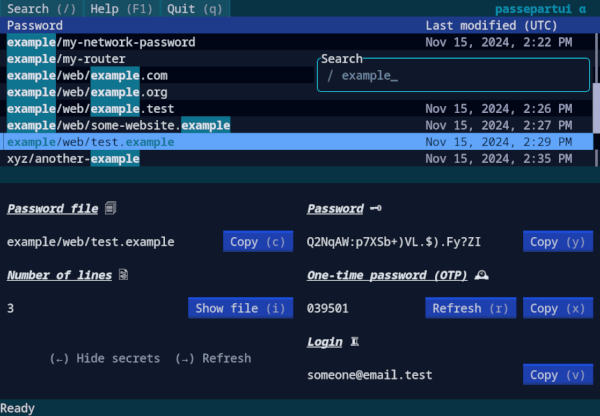
A TUI for pass
Introduction
passepartui is a text-based user interface (TUI) for pass designed for fast and intuitive access to the password store.
Features:
- Easy navigation with arrow keys and Vim keybindings
- Searching and filtering of passwords
- Support for viewing and copying of passwords and one-time passwords
- Mouse support (limited)
This project is still in an alpha state, however, user interaction is mostly done. The reason for this is that I started this project as a way to practice programming in Rust while reading the Rust Book.
Currently, no functionality for manipulating the password store (e.g. adding or deleting a password) is implemented. For those operations use pass directly from your terminal (refer to man pass).
The name passepartui is a combination of "passepartout", French for "master key", and "TUI".
Installation
Prerequisites
- Unix (tested on Linux so far)
- C system library
gpgmefor decryption operations - Rust and cargo (when compiling from source)
Installation from crates.io
passepartui can be found on crates.io.
cargo install passepartui --locked
Type passepartui to run the app (provided that ~/.cargo/bin has been added to $PATH).
Installation from the AUR
passepartui is available in the AUR. You can install it with your favorite AUR helper, e.g.:
paru -S passepartui
Installation from nixpkgs
passepartui is available in nixpkgs. You
can install it in your system via the usual ways, or try it with:
nix run nixpkgs#passepartui
Installation with Homebrew
A tap for installing passepartui with Homebrew is available with this repository.
brew tap kardwen/passepartui
brew install passepartui
Manual installation
Clone the repository and change to the directory:
git clone git@github.com:kardwen/passepartui.git
cd passepartui
Build and copy the executable to an appropriate location:
cargo build --release
cp target/release/passepartui ~/.cargo/bin
Run passepartui in a terminal.
Miscellaneous
The contrib directory contains additional files, for now an example for a desktop entry file.
A desktop entry lets you start passepartui from an application menu in a new terminal window. Configure your preferred terminal emulator for running passepartui in the desktop file passepartui.desktop and copy it to $XDG_DATA_HOME/applications which is usually ~/.local/share/applications.
Development
Contributions are very welcome! Take a look at the open issues to get started.
List of libraries used (among others):
- Ratatui for the creation of the TUI
- passepartout, which uses
Dependencies
~22–37MB
~560K SLoC