13 releases (6 stable)
Uses new Rust 2024
| 1.1.0 | Dec 6, 2025 |
|---|---|
| 1.0.4 | Oct 25, 2025 |
| 0.2.5 | Oct 18, 2025 |
| 0.2.3 | Jun 12, 2025 |
| 0.1.3 | May 12, 2025 |
#95 in Visualization
3.5MB
9K
SLoC
๐ง LeenFetch
A fast, minimal, and customizable system information tool built in Rust โ your alternative to Neofetch, for real power users. Includes JSON output and remote fetching over SSH.
โ ๏ธ LeenFetch is under active development. Expect bugs and improvements regularly!
Want to help? Contributions, testing, and feedback are always welcome!
๐ฌ Feedback & Issues
Found a bug? Got a feature idea?
Head over to the issues or join the discussions page!
๐ Table of Contents
- ๐ง LeenFetch - A fast, minimal, and customizable system information tool built in Rust โ your alternative to Neofetch, for real power users.
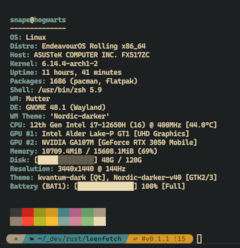
๐ธ Screenshots


๐ Features
- โก Blazing fast startup thanks to Rust
- ๐จ Customizable output layout with colorized terminal output
- ๐งฉ Modular design โ enable or disable components via config
- ๐พ Smart defaults but easily extendable
- ๐ฆ Detects installed packages, shell, GPU, DE/WM, and more
- ๐ผ๏ธ Custom ASCII art support and override via config
- ๐จ Supports theme-based color profiles (
ascii_colors=distro, etc.) - ๐ Single JSONC config:
~/.config/leenfetch/config.jsonc - ๐งต Accepts piped ASCII input โ use
fortune | cowsay | leenfetchfor dynamic text logos - ๐ Fetch remote system info over SSH (
--ssh <user>@<host>:<port>...) and reuse pretty output per host - ๐งพ Machine-readable JSON output via
--format jsonfor scripting and dashboards
โจ Packaging Status
๐ฆ Installation
Install on Arch Linux (via AUR)
If you're on Arch Linux or an Arch-based distribution (like Manjaro), you can install LeenFetch from the AUR using an AUR helper like yay:
yay -S leenfetch
or
git clone https://aur.archlinux.org/leenfetch.git
cd leenfetch
makepkg -si
Install on Debian / Ubuntu (via .deb)
If you're on Debian, Ubuntu, or a Debian-based distribution, you can download and install the .deb package from the GitHub Releases:
- AMD64 (x86_64)
wget https://github.com/drunkleen/leenfetch/releases/download/v1.1.0/leenfetch-v1.1.0-debian-x86_64.deb
sudo dpkg -i leenfetch-*.deb
- AArch64 (ARM64)
wget https://github.com/drunkleen/leenfetch/releases/download/v1.1.0/leenfetch-v1.1.0-debian-aarch64.deb
sudo dpkg -i leenfetch-*.deb
Install on Fedora / RHEL (via .rpm)
If you're using Fedora, RHEL, or another RPM-based distro, you can install LeenFetch using the .rpm file from GitHub Releases:
- AMD64 (x86_64)
wget https://github.com/drunkleen/leenfetch/releases/download/v1.1.0/leenfetch-v1.1.0-REHL-x86_64.rpm
sudo rpm -i leenfetch-*.rpm
- AArch64 (ARM64)
wget https://github.com/drunkleen/leenfetch/releases/download/v1.1.0/leenfetch-v1.1.0-REHL-aarch64.rpm
sudo rpm -i leenfetch-*.rpm
Install on Windows (via .zip)
If you're on Windows, download the latest .zip from the GitHub Releases:
powershell:
- AMD64 (x86_64)
Invoke-WebRequest -Uri "https://github.com/drunkleen/leenfetch/releases/download/v1.1.0/leenfetch-v1.1.0-windows-x86_64.zip" -OutFile "leenfetch-win.zip"
Expand-Archive .\leenfetch-win.zip -DestinationPath .
.\leenfetch-v1.1.0-windows-x86_64.exe
- AArch64 (ARM64)
Invoke-WebRequest -Uri "https://github.com/drunkleen/leenfetch/releases/download/v1.1.0/leenfetch-v1.1.0-windows-aarch64.zip" -OutFile "leenfetch-win.zip"
Expand-Archive .\leenfetch-win.zip -DestinationPath .
.\leenfetch-v1.1.0-windows-aarch64.exe
Make sure you're in the same directory as
leenfetch.exewhen running the command.
๐ ๏ธ Manual Installation (Build from Source)
git clone https://github.com/drunkleen/leenfetch.git
cd leenfetch
cargo build --release
Add to PATH:
cp target/release/leenfetch ~/.local/bin/
Then run:
leenfetch
Install from crates.io (fallback)
If you prefer installing from crates.io, make sure you have Rust & Cargo installed:
cargo install leenfetch
After that, just run:
leenfetch
If you hit issues with PATH, try adding ~/.cargo/bin to your shell:
export PATH="$HOME/.cargo/bin:$PATH"
๐ฅ Using Piped Input
LeenFetch can accept piped input to use as the ASCII logo.
This allows you to create dynamic, fun logos on the fly using other command-line tools.
Examples:
echo "Rustacean" | leenfetch
fortune | cowsay | leenfetch
LeenFetch will detect piped input via stdin and render the ASCII art above your system information.
If no piped input is provided, it will fall back to your configured or auto-detected ASCII art.
๐ Remote fetch over SSH
Query other machines directly and render their info locally. LeenFetch runs leenfetch --format json over SSH, parses it, and prints a pretty block for each host.
# Pretty output for one host (leverages your SSH config/agent)
leenfetch --ssh user@server.example.com
leenfetch --ssh user@server.example.com:port
# Multiple hosts
leenfetch --ssh user@server1 --ssh user@server2:port ...
# Script-friendly JSON
leenfetch --ssh user@server --format json
leenfetch --ssh user@server:port --format json
Notes:
- The remote host needs
leenfetchinstalled and available inPATH. - ASCII logo and colors reflect the remote distro; each host renders separately using the local layout.
- SSH options come from your standard SSH config/agent (no custom flags are parsed) and a short connect timeout is used.
- You can mix
--format jsonwith--sshto script against multiple hosts (one JSON object per host).
โ๏ธ Configuration
On first run, LeenFetch writes a single config.jsonc file to your configuration directory:
# Linux
~/.config/leenfetch/config.jsonc
# Windows
C:\Users\<username>\AppData\Roaming\leenfetch\config.jsonc
The file uses JSON with comments (JSONC), so you can keep inline explanations next to your settings. It combines the previous trio of files into a single document with clear sections:
flagsโ Display and formatting toggles.modules(aliaslayout) โ Output order, headings, and custom rows.- (optional)
logoโ Override ASCII art source or padding. Omitted keys fall back to defaults.
flags section
The flags object fine-tunes how each block is rendered. Values shown below match the generated defaults; unset keys fall back to the same defaults internally.
| Key | Allowed values | Default | What it controls |
|---|---|---|---|
ascii_distro |
"auto" or distro name |
"auto" |
ASCII art selection. Piped input always overrides this. |
ascii_colors |
"distro" or comma list of color indices |
"distro" |
Palette for ASCII art and color swatches. |
custom_ascii_path |
"" or path |
"" |
Custom ASCII art file. Leave empty for bundled art. |
battery_display |
"off", "bar", "infobar", "barinfo" |
"off" |
Battery meter style (or disable entirely). |
color_blocks |
string glyph | "โ" |
Character(s) used for the 16-color preview. |
cpu_brand |
true / false |
true |
Prefix CPU model with the vendor name. |
cpu_cores |
true / false |
true |
Show total core/thread counts. |
cpu_frequency |
true / false |
true |
Include advertised CPU frequency. |
cpu_speed |
true / false |
true |
Include current CPU speed reading. |
cpu_temp |
"C" / "F" |
"C" |
Temperature unit. Any other value skips conversion. |
cpu_show_temp |
true / false |
false |
Toggle CPU temperature output entirely. |
de_version |
true / false |
true |
Append desktop-environment version. |
distro_display |
name, name_version, name_arch, name_model, name_model_version, name_model_arch, name_model_version_arch |
"name" |
Level of OS detail shown in the distro line. |
disk_display |
info, percentage, infobar, barinfo, bar |
"info" |
Disk usage presentation for each mount. |
disk_subtitle |
name, dir, none, mount |
"dir" |
Label used alongside disk usage. |
memory_percent |
true / false |
true |
Add percentage to the memory line. |
memory_unit |
kib, mib, gib |
"mib" |
Preferred memory units. |
package_managers |
off, on, tiny |
"tiny" |
Package counter verbosity. |
refresh_rate |
true / false |
true |
Append monitor refresh rate where available. |
shell_path |
true / false |
false |
Print full shell path instead of name only. |
shell_version |
true / false |
true |
Append shell version. |
uptime_shorthand |
full, tiny, seconds |
"tiny" |
Uptime formatting style. |
os_age_shorthand |
full, tiny, seconds |
"tiny" |
OS install age formatting style. |
โน๏ธ Piped input (for example
fortune | cowsay | leenfetch) replaces the ASCII logo regardless ofascii_distroorcustom_ascii_path.
Here is a compact example that shortens durations and hides temperature and refresh-rate extras:
{
"flags": {
"uptime_shorthand": "tiny",
"cpu_show_temp": false,
"refresh_rate": false,
"package_managers": "on"
}
}
logo section (optional)
Use the logo object to point to custom ASCII art or adjust how the bundled ASCII art is padded. When type is "file" the source path behaves just like custom_ascii_path.
{
"logo": {
"type": "file",
"source": "~/.config/leenfetch/branding/about.txt",
"padding": { "top": 2, "right": 6, "left": 0 }
}
}
modules array
The modules array (also accepted as layout) controls rendering order. Entries can be a literal string ("break" inserts an empty spacer) or an object describing a module. Objects accept a type (collector name such as titles, distro, os_age, uptime, etc.) and optional properties like key for the label or format for custom text.
{
"modules": [
"break",
{ "type": "custom", "format": "== System ==" },
{ "type": "titles", "key": "User" },
{ "type": "distro", "key": "Distro" },
{ "type": "cpu", "key": "CPU" },
{ "type": "memory", "key": "Memory" },
{ "type": "colors", "key": "" }
]
}
Rearrange, duplicate, or remove entries to customize your output. Insert "break" wherever you want an empty spacer line.
How to Edit
- Open
config.jsoncin your favorite text editor. - Read the inline comments for a full explanation of every option.
- Change values as you like, save, and re-run
leenfetchto see your changes.
For advanced details, see the comments in config.jsonc or check the wiki (if available).
CLI overrides
Need a temporary tweak for screenshots or testing? LeenFetch now mirrors most flags settings on the CLI so you can adjust the output without touching config.jsonc.
- Core controls:
--help,--version,--list-options,--init,--reinit,--config <path>, and--no-config(ignore files, use built-in defaults). - ASCII controls:
--ascii_distro <name>,--ascii_colors <list>,--custom_ascii_path <file>, and--color-blocks <glyph>. - Formatting knobs:
--battery-display,--disk-display,--disk-subtitle,--memory-unit,--packages,--uptime,--os-age,--distro-display,--cpu-temp-unit, and--format <pretty|json>for output style. - Remote + layout:
--ssh <host>[,<host>...]to fetch via SSH,--only cpu,memory,shellto render a subset,--hide gputo drop modules from the current layout. - Boolean toggles come in pairsโuse
--cpu-speed/--no-cpu-speed,--shell-path/--no-shell-path,--memory-percent/--no-memory-percent, etc., for quick on/off control of individual fields.
Run leenfetch --help to see the complete list of overrides.
๐ฏ Roadmap
| Feature | Status |
|---|---|
| Base module system | โ Done |
| Config file loader | โ Done |
| Custom layout tags | โ Done |
| GPU/CPU/Mem/DE/WM detection | โ Done |
| Linux support | โ Done |
| Windows support | โ Done |
| Multi-Threading | โ Done |
| CLI override options | ๐ Basic |
| ASCII art & theming | ๐ Basic |
| Plugin/module system | โ Maybe |
| Fetch info over SSH | โ Done |
๐ค Contributing
- Fork the repo
- Create your branch (
git checkout -b feature/my-feature) - Commit your changes (
git commit -m 'feat: add my feature') - Push to the branch (
git push origin feature/my-feature) - Create a Pull Request
We welcome clean PRs and documented modules! โจ
โ Support LeenFetch
If you have found LeenFetch valuable and would like to contribute to its ongoing development, your support is greatly appreciated. You can show your appreciation by making a donation through PayPal or any of the following cryptocurrency networks:
- Bitcoin (BTC):
bc1qsmvxpn79g6wkel3w67k37r9nvzm5jnggeltxl6 - ETH/BNB/MATIC (ERC20, BEP20):
0x8613aD01910d17Bc922D95cf16Dc233B92cd32d6 - USDT/TRON (TRC20):
TGNru3vuDfPh5zBJ31DKzcVVvFgfMK9J48 - Dogecoin (DOGE):
D8U25FjxdxdQ7pEH37cMSw8HXBdY1qZ7n3
Your generous contribution ensures the continued improvement and maintenance of LeenFetch. โค๏ธ
Thank you for supporting the project! ๐
๐ License
๐ก Inspiration
Dependencies
~6โ11MB
~195K SLoC