19 releases (4 breaking)
Uses new Rust 2024
| 0.5.6 | Mar 29, 2025 |
|---|---|
| 0.5.5 | Mar 27, 2025 |
| 0.4.2 | Feb 28, 2025 |
| 0.3.2 | Feb 13, 2025 |
| 0.1.1 | Nov 29, 2024 |
#1391 in Command line utilities
309 downloads per month
Used in augur
22KB
215 lines
haruspex







"Hacking is the discipline of questioning all your assumptions all of the time."
-- Dave Aitel
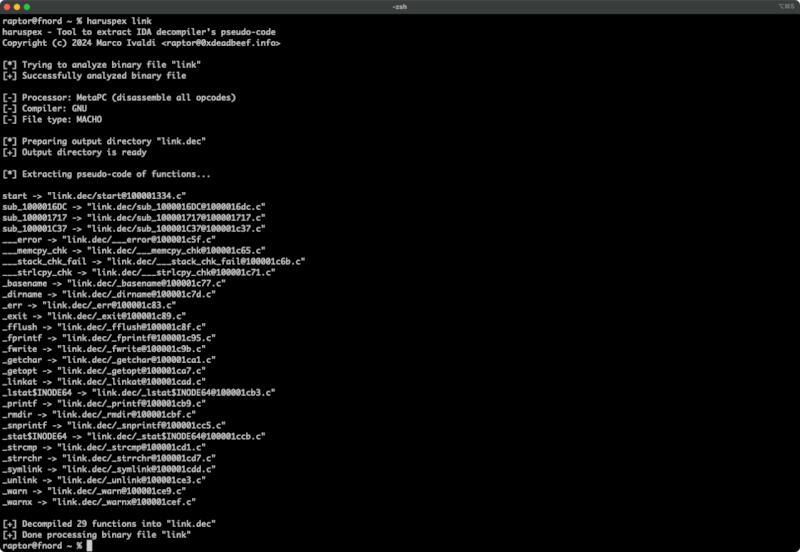
Haruspex is a blazing fast IDA Pro headless plugin that extracts pseudo-code generated by IDA Pro's decompiler in a format that should be suitable to be imported into an IDE or parsed by static analysis tools such as Semgrep, weggli, or oneiromancer.
Features
- Blazing fast, headless user experience courtesy of IDA Pro 9 and Binarly's idalib Rust bindings.
- Support for binary targets for any architecture implemented by IDA Pro's Hex-Rays decompiler.
- Pseudo-code of each function is stored in a separated file in the output directory for easy inspection.
- External crates can invoke
decompile_to_fileto decompile a function and save its pseudo-code to disk.
Blog post
See also
- https://github.com/0xdea/ghidra-scripts/blob/main/Haruspex.java
- https://github.com/0xdea/semgrep-rules
- https://github.com/0xdea/weggli-patterns
- https://docs.hex-rays.com/release-notes/9_0#headless-processing-with-idalib
- https://github.com/binarly-io/idalib
- https://github.com/xorpse/parascope
- https://security.humanativaspa.it/automating-binary-vulnerability-discovery-with-ghidra-and-semgrep
Installing
The easiest way to get the latest release is via crates.io:
- Download, install, and configure IDA Pro (see https://hex-rays.com/ida-pro).
- Download and extract the IDA SDK (see https://docs.hex-rays.com/developer-guide).
- Install LLVM/Clang (see https://rust-lang.github.io/rust-bindgen/requirements.html).
- On Linux/macOS, install as follows:
On Windows, instead, use the following commands:export IDASDKDIR=/path/to/idasdk export IDADIR=/path/to/ida # if not set, the build script will check common locations cargo install haruspex$env:LIBCLANG_PATH="\path\to\clang+llvm\bin" $env:PATH="\path\to\ida;$env:PATH" $env:IDASDKDIR="\path\to\idasdk" $env:IDADIR="\path\to\ida" # if not set, the build script will check common locations cargo install haruspex
Compiling
Alternatively, you can build from source:
- Download, install, and configure IDA Pro (see https://hex-rays.com/ida-pro).
- Download and extract the IDA SDK (see https://docs.hex-rays.com/developer-guide).
- Install LLVM/Clang (see https://rust-lang.github.io/rust-bindgen/requirements.html).
- On Linux/macOS, compile as follows:
On Windows, instead, use the following commands:git clone --depth 1 https://github.com/0xdea/haruspex cd haruspex export IDASDKDIR=/path/to/idasdk # or edit .cargo/config.toml export IDADIR=/path/to/ida # if not set, the build script will check common locations cargo build --releasegit clone --depth 1 https://github.com/0xdea/haruspex cd haruspex $env:LIBCLANG_PATH="\path\to\clang+llvm\bin" $env:PATH="\path\to\ida;$env:PATH" $env:IDASDKDIR="\path\to\idasdk" $env:IDADIR="\path\to\ida" # if not set, the build script will check common locations cargo build --release
Usage
- Make sure IDA Pro is properly configured with a valid license.
- Run as follows:
haruspex <binary_file> - Find the extracted pseudo-code of each decompiled function in the
binary_file.decdirectory:vim <binary_file>.dec code <binary_file>.dec
Compatibility
- IDA Pro 9.0.240925 - Latest compatible: v0.1.3.
- IDA Pro 9.0.241217 - Latest compatible: v0.4.2.
- IDA Pro 9.1.250226 - Latest compatible: current version.
Note: check idalib documentation for additional information.
Changelog
TODO
- Integrate with Semgrep scanning (see https://github.com/0xdea/semgrep-rules).
- Integrate with weggli scanning (see https://github.com/0xdea/weggli-patterns).
- Improve decompiler output in the style of HexRaysPyTools and abyss.
- Implement parallel analysis (see https://github.com/fugue-re/fugue-mptp).
Dependencies
~3–13MB
~176K SLoC