12 releases
| 0.1.71 | Aug 31, 2025 |
|---|---|
| 0.1.60 | Aug 31, 2025 |
| 0.1.53 | Oct 28, 2024 |
| 0.0.32 |
|
#215 in Command line utilities
510 downloads per month
1MB
1K
SLoC
Shelf
Your personal CLI bookshelf for storing and recalling useful commands. Shelf allows you to store commands in their respective collections, created by you.
No more "I know I used this command last month, but what was it again?" moments
Installing with Cargo
View the crates.io page here
Requirements:
- Cargo/Rust
- Cargo install
Install the shelf binary:
cargo install shelf-cli
The install might give you a warning:
Be sure to add /path/to/.cargo/bin (it will tell you) to your PATH to be able to run the installed binaries.
Building from source
Requirements:
- Rust
- Git (ofc)
- Clone the repo
git clone https://github.com/maytees/shelf
- Build it
cargo build
How to use
Saving a command
This will store a command to the global collection.
shelf stack -d "Prints out HOME env var" echo $HOME
To stack a command with tags, specifiy with the -t flag.
shelf stack -d "Builds a NextJS Project" -t nextjs,npx,npm npx next build
Command Templates
Shelf supports command templates using {{parameter}} syntax. When you save a command with double curly brace parameters, it becomes a template that will prompt for values when run.
Saving templates
# SSH template
shelf stack -d "SSH to any server" ssh {{user}}@{{host}}
# Docker template
shelf stack -d "Run container interactively" docker run -it {{image}} {{command}}
# Git clone with branch
shelf stack -d "Clone specific branch" git clone -b {{branch}} {{repo}}
Running templates
When you run a template command, Shelf will prompt for each parameter:
shelf run 5
# This is a template command. Please provide values:
# Enter user: admin
# Enter host: myserver.com
# Executes: ssh admin@myserver.com
Template features
- Automatic detection: Any command with
{{param}}becomes a template - Unique parameters: Same parameter name used multiple times gets same value
- Works everywhere: Templates work with
run,copy, and fuzzy search - No conflicts: Regular
{braces},$variables, and<redirections>work normally - Literal braces: Use
\{{text}}to save literal{{text}}without templating
Listing commands
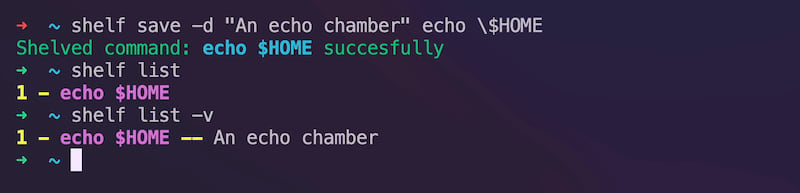
By default, this will act similar to shell history, and print out saved commands in order.
Use the --verbose flag to display the command description, and tags
in addition to just the id and command
shelf list
Options
-v, --verbose In addition to ID, and command, display tags, and description
-r, --reverse Reverse the order of the listed commands
-l, --limit <LIMIT> Limit the order of the listed commands
Running a command
[!TIP] If a command is saved with an environment variable, the variable will be evaluated when you run the command. If you wish to evaluate the variable when you stack the command, use your shell's method of entering variables as plain strings. For example in zsh you add a
\before the variable:\$HOME.
Currently, there are two ways to fetch commands in shelf:
- Running
- Copying to clipboard
Running
To run a command, first find the id of the command via shelf list
shelf run <ID>
To run a command AND copy it to clipboard:
shelf run -c <ID>
Copying to clipboard
Copy a command to clipboard without running it:
shelf copy <ID>
# or use the short alias
shelf c <ID>
Deleting commands
Remove a saved command permanently:
shelf delete <ID>
Editing commands
Managing tags
Add a tag to an existing command:
shelf addtag <ID> <TAG>
Remove a tag from a command:
shelf rmtag <ID> <TAG>
Editing descriptions and commands
Update the description of a saved command:
shelf editdesc <ID> "New description here"
Edit the command string itself:
shelf editcommand <ID> new command here
Fuzzy searching
You are able to fuzzy search commands to either run them or copy them.
Run via fuzzy search
shelf fuzz
Copying to clipbaord via fuzzy search
shelf fuzz -c
Config
The configuration for shelf is currently very limited. Here is what is configurable at the moment:
Auto Verbose
Automatically outputs verbose list of commands (default: false)
auto_verbose = false
Environment Variables
Shelf supports the following environment variables to customize file locations:
SHELF_DATA_DIR
Override the default data directory where commands are stored:
export SHELF_DATA_DIR="/custom/path"
# Commands will be stored in /custom/path/cmds.toml
SHELF_CONFIG_DIR
Override the default config directory:
export SHELF_CONFIG_DIR="/custom/config/path"
# Config will be stored in /custom/config/path/config.toml
These are particularly useful for testing or when you want to use different shelf instances.
Shell Completion
Shelf supports shell completion for bash, zsh, fish, and PowerShell.
Generate completion scripts
# For bash
shelf completion bash > ~/.local/share/bash-completion/completions/shelf
# For zsh
shelf completion zsh > ~/.zsh/completions/_shelf
# For fish
shelf completion fish > ~/.config/fish/completions/shelf.fish
# For PowerShell
shelf completion powershell > shelf.ps1
Setup instructions
Bash:
# Add to ~/.bashrc
source ~/.local/share/bash-completion/completions/shelf
Zsh:
# Add to ~/.zshrc
fpath=(~/.zsh/completions $fpath)
autoload -U compinit && compinit
Fish:
Fish will automatically load completions from ~/.config/fish/completions/
PowerShell:
# Add to your PowerShell profile
. ./shelf.ps1
Testing
Run the test suite with:
cargo test
The tests use temporary directories and environment variable isolation to avoid interfering with your personal shelf data.
Todo
- Save
- Stack globally
- Stack to a collection
- Stack with tags
- List
- List a collection
- Reverse flag
- Limit flag
- Verbose flag
- Description
- Tags
- Collection
- Run commands
- Via search
- Via id (similar to shell history)
- Copy command via flag
- Edit commands
- Delete commands
- Add tags to existing commands
- Remove tags from commands
- Edit command descriptions
- Edit command strings
- Search
- Fuzzy search
- Search by tag
- Search a collection by tag
- Shell history integration
- Colored output (for readability)
- Run Command on store
- Save command output
- Store x lines of output
- Save command output
- Much more...
Dependencies
~6–23MB
~307K SLoC