1 unstable release
| 0.2.0 | Feb 20, 2025 |
|---|
#232 in #time
130KB
2K
SLoC
OPPENHEIMER
Earn you reputation, one task at a time
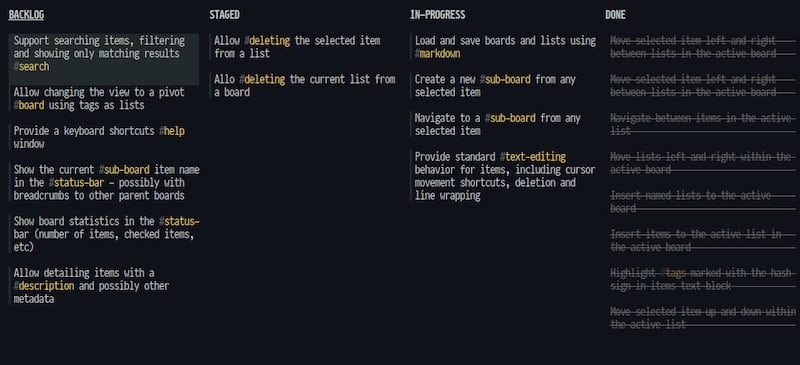
OPPENHEIMER is a Taskell-inspired hierarchical listboard app, perfect for terminal lovers who hope to make the world a better place.
OPPENHEIMER is for the organized scientist. Whether you're plotting world domination or just trying to get through Monday, this listboard app will help you stay on track - or not.
Features
- 📋 Hierarchical Listboards: Because sometimes simple listboards just don't cut it.
- 🌈 Lean & Simple: Less bells, less whistles.
- ⚡ Fast & Efficient: Built for the keyboard-oriented mad scientist.
- 🛠️ Customizable?: Yes! just tweak the code to suit your style or theme of the day.
- 🚀 Terminal-based: For those who live and breathe the terminal.
Get Started
- Clone the Repo:
git clone https://github.com/rlofc/oppenheimer.git - Dive In: Navigate to the directory and run
cargo build --release - Create Your First List: Start organizing like a pro! using
cargo run --release my_project.md
Key-mapping
| Key Combination | Action |
|---|---|
Ctrl + o |
Insert list to board |
o |
Insert item to current list |
Ctrl + d |
Delete a list |
d |
Delete an item |
Down or j |
Move down |
Up or k |
Move up |
Right or l |
Move right |
Left or h |
Move left |
Ctrl + Left or Ctrl + h |
Move item to previous list |
Ctrl + Right or Ctrl + l |
Move item to next list |
Ctrl + Down or Ctrl + j |
Deprioritize selected item |
Ctrl + Up or Ctrl + k |
Prioritize selected item |
Shift + Left or Shift + h |
Shuffle list forward |
Shift + Right or Shift + l |
Shuffle list back |
Enter |
Edit current item |
Space |
Toggle current item selection |
Tab |
Open item sub-board |
Esc |
Go back to the previous board |
u |
Undo action |
r |
Redo action |
q |
Quit application |
Contribution
Feeling adventurous? Fork the repo and add your magic touch. PRs are always welcome!
License
OPPENHEIMER is licensed under the BSD License, so feel free to use, modify, and distribute it to your heart's content.
Dependencies
~9–18MB
~262K SLoC