6 releases
| new 0.1.9 | May 7, 2025 |
|---|---|
| 0.1.9-rc.1 | Feb 16, 2025 |
| 0.1.8 | Jan 1, 2025 |
| 0.1.7 | Oct 28, 2024 |
| 0.1.6-rc.5 | Sep 19, 2024 |
#1045 in Images
911 downloads per month
Used in 6 crates
(3 directly)
96KB
2K
SLoC
kornia-rs: low level computer vision library in Rust





The kornia crate is a low level library for Computer Vision written in Rust 🦀
Use the library to perform image I/O, visualisation and other low level operations in your machine learning and data-science projects in a thread-safe and efficient way.
Getting Started
cargo run --bin hello_world -- --image-path path/to/image.jpg
use kornia::image::Image;
use kornia::io::functional as F;

fn main() -> Result<(), Box<dyn std::error::Error>> {
    // read the image
    let image: Image<u8, 3> = F::read_image_any_rgb8("tests/data/dog.jpeg")?;

    println!("Hello, world! 🦀");
    println!("Loaded Image size: {:?}", image.size());
    println!("\nGoodbyte!");

    Ok(())
}
Hello, world! 🦀
Loaded Image size: ImageSize { width: 258, height: 195 }

Goodbyte!
Features
- 🦀The library is primarly written in Rust.
- 🚀 Multi-threaded and efficient image I/O, image processing and advanced computer vision operators.
- 🔢 Efficient Tensor and Image API for deep learning and scientific computing.
- 🐍 Python bindings are created with PyO3/Maturin.
- 📦 We package with support for Linux amd64/arm64, Macos and WIndows.
- Supported Python versions are 3.7/3.8/3.9/3.10/3.11/3.12/3.13
Supported image formats
- Read images from AVIF, BMP, DDS, Farbeld, GIF, HDR, ICO, JPEG (libjpeg-turbo), OpenEXR, PNG, PNM, TGA, TIFF, WebP.
Image processing
- Convert images to grayscale, resize, crop, rotate, flip, pad, normalize, denormalize, and other image processing operations.
Video processing
- Capture video frames from a camera and video writers.
🛠️ Installation
>_ System dependencies
Dependeing on the features you want to use, you might need to install the following dependencies in your system:
turbojpeg
sudo apt-get install nasm
gstreamer
sudo apt-get install libgstreamer1.0-dev libgstreamer-plugins-base1.0-dev
** Check the gstreamr installation guide: https://docs.rs/gstreamer/latest/gstreamer/#installation
🦀 Rust
Add the following to your Cargo.toml:
[dependencies]
kornia = "v0.1.8"
Alternatively, you can use each sub-crate separately:
[dependencies]
kornia-tensor = { git = "https://github.com/kornia/kornia-rs", tag = "v0.1.8" }
kornia-io = { git = "https://github.com/kornia/kornia-rs", tag = "v0.1.8" }
kornia-image = { git = "https://github.com/kornia/kornia-rs", tag = "v0.1.8" }
kornia-imgproc = { git = "https://github.com/kornia/kornia-rs", tag = "v0.1.8" }
kornia-3d = { git = "https://github.com/kornia/kornia-rs", tag = "v0.1.8" }
kornia-icp = { git = "https://github.com/kornia/kornia-rs", tag = "v0.1.8" }
🐍 Python
pip install kornia-rs
Examples: Image processing
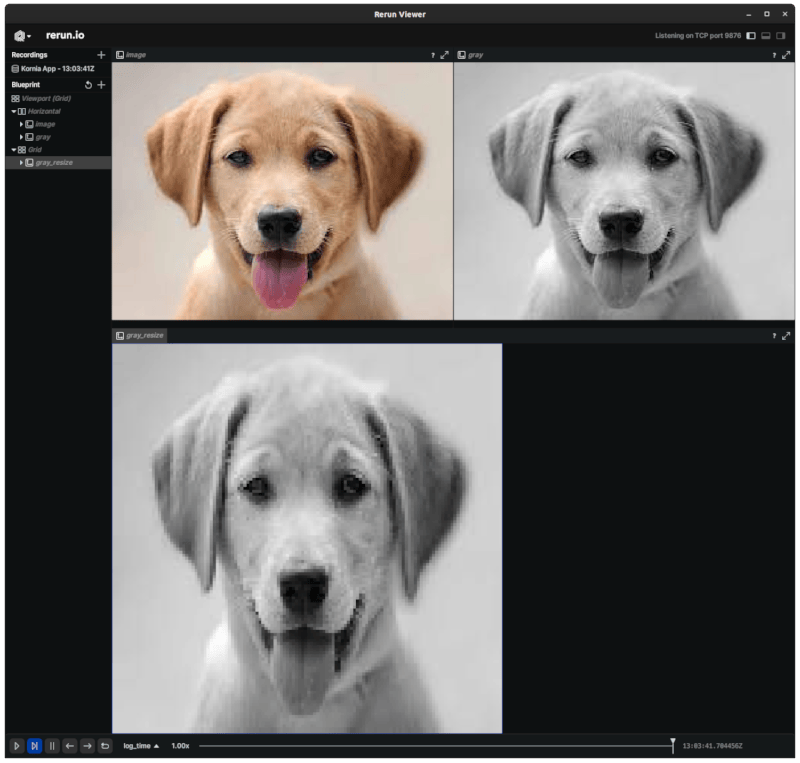
The following example shows how to read an image, convert it to grayscale and resize it. The image is then logged to a rerun recording stream.
Checkout all the examples in the examples directory to see more use cases.
use kornia::{image::{Image, ImageSize}, imgproc};
use kornia::io::functional as F;

fn main() -> Result<(), Box<dyn std::error::Error>> {
    // read the image
    let image: Image<u8, 3> = F::read_image_any_rgb8("tests/data/dog.jpeg")?;
    let image_viz = image.clone();

    let image_f32: Image<f32, 3> = image.cast_and_scale::<f32>(1.0 / 255.0)?;

    // convert the image to grayscale
    let mut gray = Image::<f32, 1>::from_size_val(image_f32.size(), 0.0)?;
    imgproc::color::gray_from_rgb(&image_f32, &mut gray)?;

    // resize the image
    let new_size = ImageSize {
        width: 128,
        height: 128,
    };

    let mut gray_resized = Image::<f32, 1>::from_size_val(new_size, 0.0)?;
    imgproc::resize::resize_native(
        &gray, &mut gray_resized,
        imgproc::interpolation::InterpolationMode::Bilinear,
    )?;

    println!("gray_resize: {:?}", gray_resized.size());

    // create a Rerun recording stream
    let rec = rerun::RecordingStreamBuilder::new("Kornia App").spawn()?;

    rec.log(
        "image",
        &rerun::Image::from_elements(
            image_viz.as_slice(),
            image_viz.size().into(),
            rerun::ColorModel::RGB,
        ),
    )?;

    rec.log(
        "gray",
        &rerun::Image::from_elements(gray.as_slice(), gray.size().into(), rerun::ColorModel::L),
    )?;

    rec.log(
        "gray_resize",
        &rerun::Image::from_elements(
            gray_resized.as_slice(),
            gray_resized.size().into(),
            rerun::ColorModel::L,
        ),
    )?;

    Ok(())
}
Python usage
Load an image, that is converted directly to a numpy array to ease the integration with other libraries.
    import kornia_rs as K
    import numpy as np

    # load an image with using libjpeg-turbo
    img: np.ndarray = K.read_image_jpeg("dog.jpeg")

    # alternatively, load other formats
    # img: np.ndarray = K.read_image_any("dog.png")

    assert img.shape == (195, 258, 3)

    # convert to dlpack to import to torch
    img_t = torch.from_dlpack(img)
    assert img_t.shape == (195, 258, 3)
Write an image to disk
    import kornia_rs as K
    import numpy as np

    # load an image with using libjpeg-turbo
    img: np.ndarray = K.read_image_jpeg("dog.jpeg")

    # write the image to disk
    K.write_image_jpeg("dog_copy.jpeg", img)
Encode or decode image streams using the turbojpeg backend
import kornia_rs as K

# load image with kornia-rs
img = K.read_image_jpeg("dog.jpeg")

# encode the image with jpeg
image_encoder = K.ImageEncoder()
image_encoder.set_quality(95)  # set the encoding quality

# get the encoded stream
img_encoded: list[int] = image_encoder.encode(img)

# decode back the image
image_decoder = K.ImageDecoder()

decoded_img: np.ndarray = image_decoder.decode(bytes(image_encoded))
Resize an image using the kornia-rs backend with SIMD acceleration
import kornia_rs as K

# load image with kornia-rs
img = K.read_image_jpeg("dog.jpeg")

# resize the image
resized_img = K.resize(img, (128, 128), interpolation="bilinear")

assert resized_img.shape == (128, 128, 3)
🧑💻 Development
Pre-requisites: install rust and python3 in your system.
Install rustup in your system
curl --proto '=https' --tlsv1.2 -sSf https://sh.rustup.rs | sh
Install uv to manage python dependencies
curl -LsSf https://astral.sh/uv/install.sh | sh
Install the just command runner. This tool is used to manage the development tasks.
cargo install just
Clone the repository in your local directory
git clone https://github.com/kornia/kornia-rs.git
You can check the available commands by running just in the root directory of the project.
$ just
Available recipes:
    check-environment                 # Check if the required binaries for the project are installed
    clean                             # Clean up caches and build artifacts
    clippy                            # Run clippy with all features
    clippy-default                    # Run clippy with default features
    fmt                               # Run autoformatting and linting
    py-build py_version='3.9'         # Create virtual environment, and build kornia-py
    py-build-release py_version='3.9' # Create virtual environment, and build kornia-py for release
    py-install py_version='3.9'       # Create virtual environment, and install dev requirements
    py-test                           # Test the kornia-py code with pytest
    test name=''                      # Test the code or a specific test
🐳 Devcontainer
This project includes a development container to provide a consistent development environment.
The devcontainer is configured to include all necessary dependencies and tools required for building and testing the kornia-rs project. It ensures that the development environment is consistent across different machines and setups.
How to use
-
Install Remote - Containers extension: In Visual Studio Code, install the
Remote - Containersextension from the Extensions view (Ctrl+Shift+X). -
Open the project in the container:
- Open the
kornia-rsproject folder in Visual Studio Code. - Press
F1and selectRemote-Containers: Reopen in Container.
- Open the
Visual Studio Code will build the container and open the project inside it. You can now develop, build, and test the project within the containerized environment.
🦀 Rust
Compile the project and run the tests
just test
For specific tests, you can run the following command:
just test image
🐍 Python
To build the Python wheels, we use the maturin package. Use the following command to build the wheels:
just py-build
To run the tests, use the following command:
just py-test
💜 Contributing
This is a child project of Kornia. Join the community to get in touch with us, or just sponsor the project: https://opencollective.com/kornia
Dependencies
~0.3–0.8MB
~18K SLoC